In past games, I’ve had some save and load functionality, but it was pretty simple stuff. With Grub Gauntlet, I essentially just had to store the postion, rotation and object type data of different gameObjects. Which meant that all that needed to be done was iterate through the objects and save the three pieces of data for each object.
Loading was the inverse, iterating through the list and instantating by the saved type. Super easy.
My next (current) project was more complicated and was going to need something more in the save and load department.
But first a quick disclaimer. This post is NOT about creating a system to serialize your data and write to a file. This post is about taking the sizeable problem of saving a complex game state and breaking that down into smaller manageable chunks. And I’ve done that by creating a framework or pattern that lays the foundation for a scalable and manageble complete save and load system. If you’re looking for serialization and saving to a file, and happen to be using Unity, I highly highyl recommend Easy Save. It’s worth every dollar.
Needing Something More
Deep Space Directive (my third published game) is a resouce managment game with dozens of different resouces and almost as many buildings that create, process and modify and those resources. With that comes the complexity of inventory, stats, transport systems, tech trees, upgrades and a whole lot more.
Iterating through the scene objects and attempting to save the data object by object - wasn’t going to work and certainly wasn’t going to scale well as new mechanics got added to the game.
To be honest, I was dreading figuring out the save system. I kept putting it off and putting it off. Maybe even hoping the game would magically simplify itself and not need much of a save system… Wishful thinking!
Then somehow I stumbled on to a simple idea and it all came together - surprisingly quickly.
How It Works
Rather than create a giant monolithic class that somehow magically reaches out into the scene and grabs all the data… I created a single manger class and a simple interface.
The classes implementing the interface get to deal with their own save and load issues. Keeping objects responsible for their own data - while allowing much of the data to be private and local to a class without a mess of public getters or such things. It also means that each chunk of save code is smaller and easier to understand and modify.
The manager class then maintains a collection of classes that implement the interface. This collection is populated by the classes registering and unregistering themselves with the manager. Then when its time to save or load - the manager would call the respective public function from the interface to start the saving or loading for each of the objects in the collection.
Now that write it out… it seems obvious. Simple and easy. Not to mention very scalable when adding new game mechanics. While the system has gone through some iterations and improvements the basic idea has stayed the same throughout the development of the game and has been in use for well over a year.
ISaveData
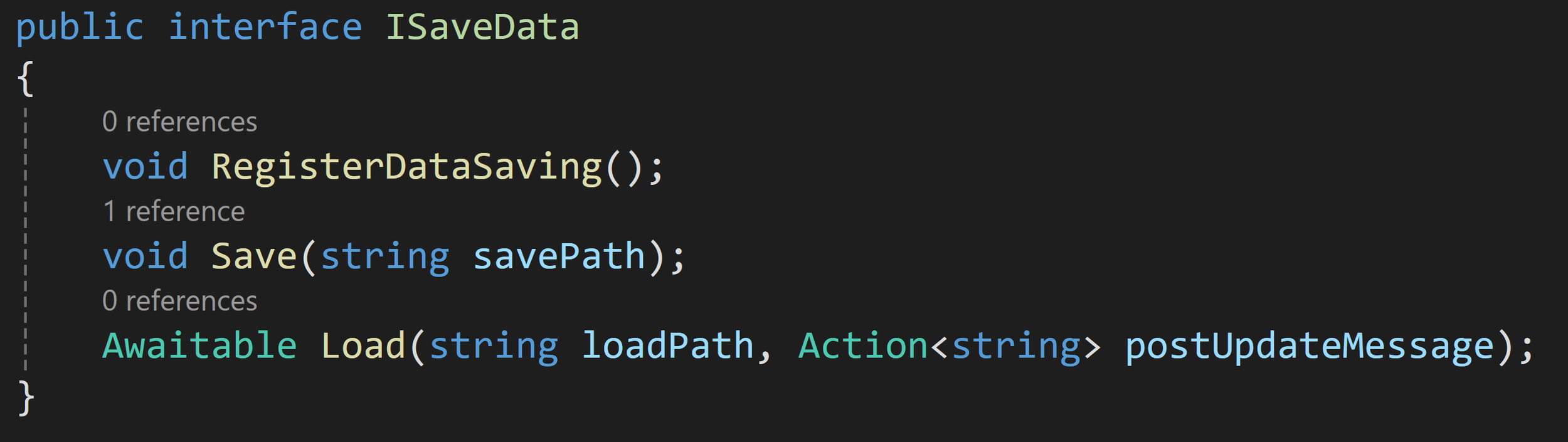
The interface has 3 functions, only 2 of which are strictly needed. The RegisterDataSaving function is not necessary, but was an attempt to remind myself that I needed to register the class with the manger… I still forget about half the time.
The save function takes in a file path and does what ever data processing that needs to happen. Sometimes it’s super simple and short. Other times it gets messy. Whatever the class needs. But! The class handles it all by itself. Keeping good separate or tasks and roles.
The load function has been through more changes than any other part of the system. It started as a vanilla function, then at some point it became a coroutine and most recently with the ease of use of Unity’s awaitable functions it has become an async function.
For my projects, the process of loading and instantiating all of the scene objects makes some sort of aysnc functionality a necessity to spread the load over mulitple frames. In my case I have 10’s of thousands of hex tiles that need to be instantiated and trying to do that all in a single frame simply isn’t a good experience.
Awaiting the actual load functions also allows classes with more complex loading to wait additonal frames - for example waiting after every 20 or 50 tiles are instantiated, not just once after all 10,000 tiles were instantiated.
I’ve also added an action parameter to the load function. I use it to post update messages so the player can see that something is happening while waiting for the file to load. This enables each class to send it’s own customized update message and make use of any internal data in that message - for example giving an accurate count of tiles created or what types of building is being added.
SaveLoadManager
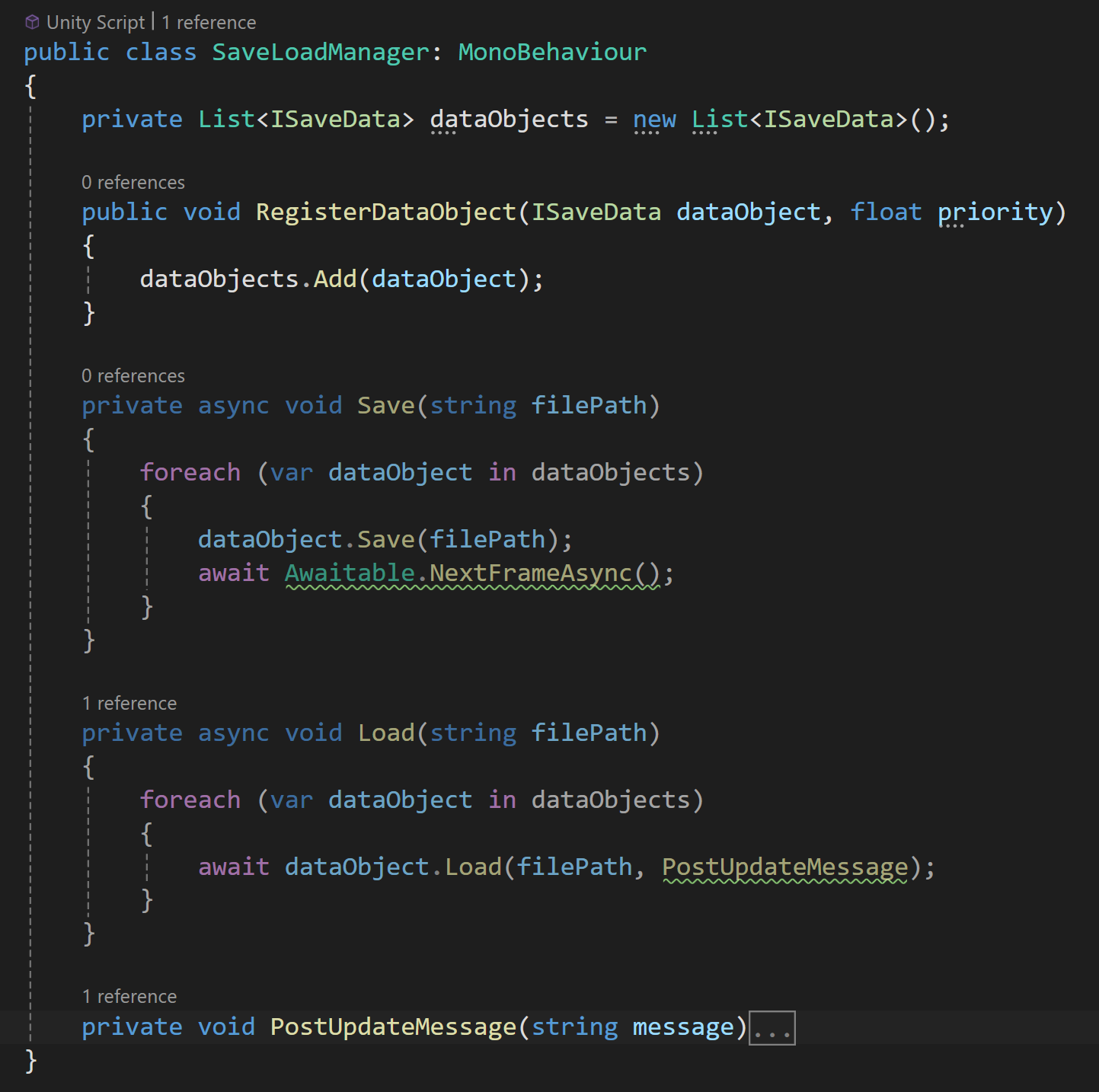
As mentioned before, each class that implements the ISaveData interface will register itself with the SaveLoadManager. The SaveLoadManager then adds the interace to a collection.
When it comes time to save, the manager iterates through the collection and calls Save on all of the classes implementing ISaveData and similiarly the manager calls Load when its time to the load data into the scene.
To hit on it again, one of the main motivations for creating this framework was getting access to the necessary data - much of the data that needs to be saved is private or local within each class. This left me with the options of making everything public, adding public getters, or trying to wrap all the data in some sort of data container that can be passed back and forth. None of these seemed very palatable or scalable.
So instead, by a class implementing the ISaveData interface, the Save and Load functions automatically have access to all of the class wide data. This means that each class is responsible for it’s own saving and loading! Which has the fanastic added benefit that when I create a new object (a new game mechanic) that needs to save or load data I don’t have modifiy the SaveLoadManager class - at all!
Nice and tidy.
And that’s kind of it. That’s the main idea. For many of you this might be all you need to role your own version of this system. But! We can add a few more useful details.
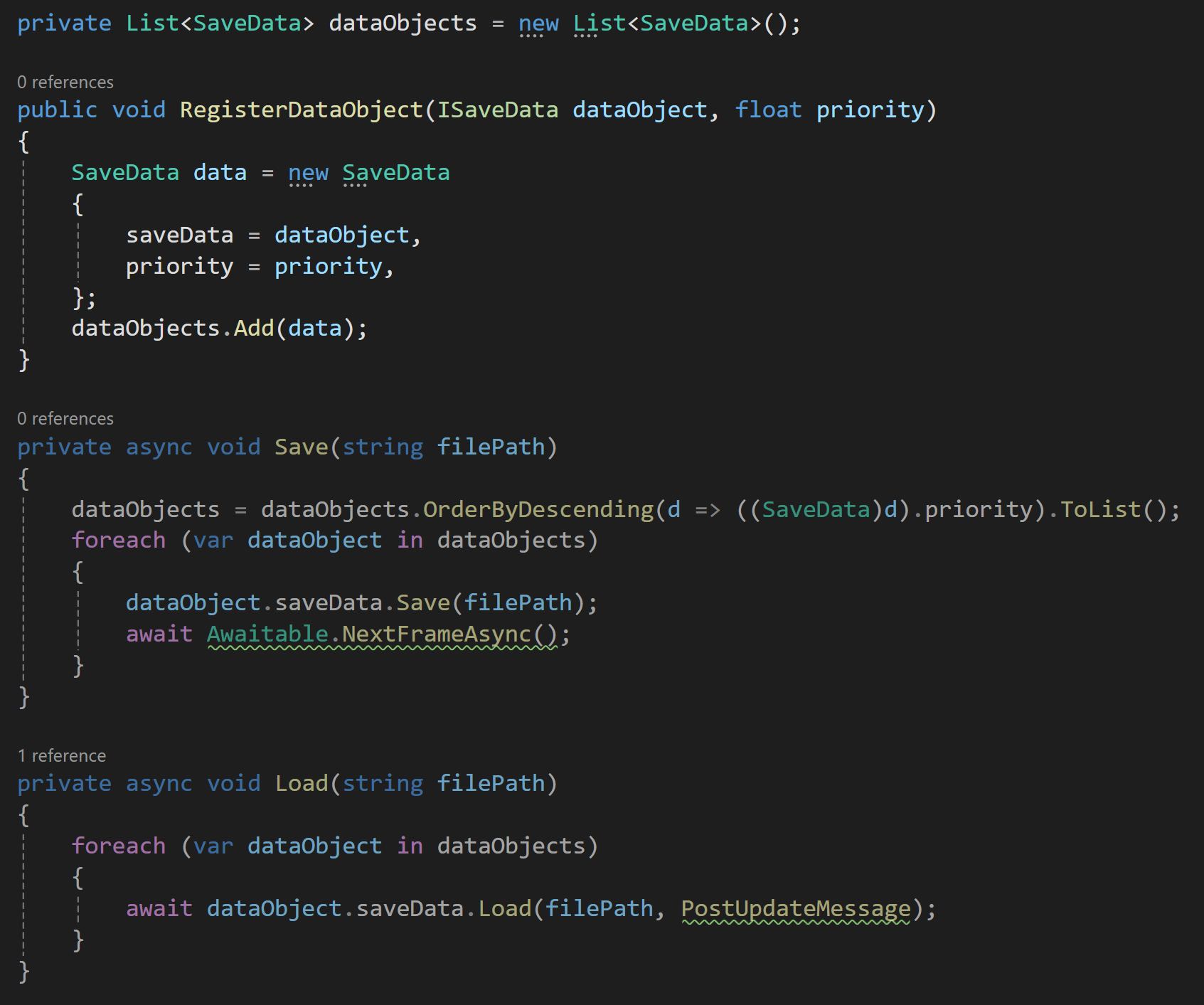
Modified to allow priority registration
Priority Registration
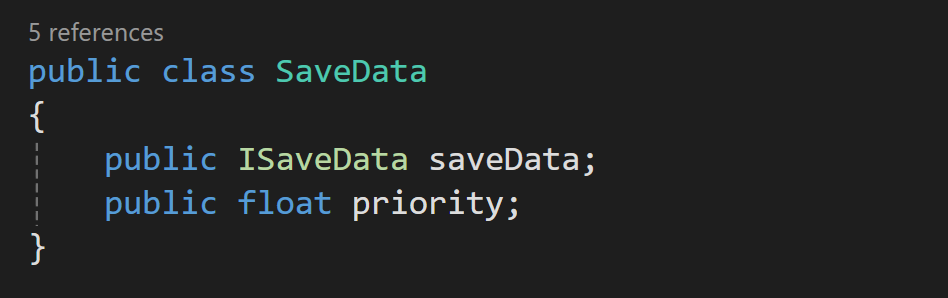
For some systems and some data, save and load order doesn’t matter, but for other systems it definitely does! To handle this, I made a few adjustments to the system. I added a data container class, SaveData, that holds a reference to the ISaveData object as well as to a priority value.
So when registering with the SaveLoadManager each interface can set a priority value. Then before calling Save or Load the manager class can sort the collection by priority to ensure the data is handled in the correct order.
Again, nice and tidy all while giving good control.
Real World Application
All too often nice and tidy solutions are presented on the internet without the complexity that occurs with real world application. While this framework is solid and I’ve been using it for well over a year. There are some issues I’ve run into that I felt were worth acknowledging. They aren’t inheritant to this framework, but nonentheless might be issues others will run into as well.
File Validation
The save process can be long and if something goes wrong in the middle it’s very possible the save process doesn’t complete. If this then partially saved file is then loaded… bad things can happen.
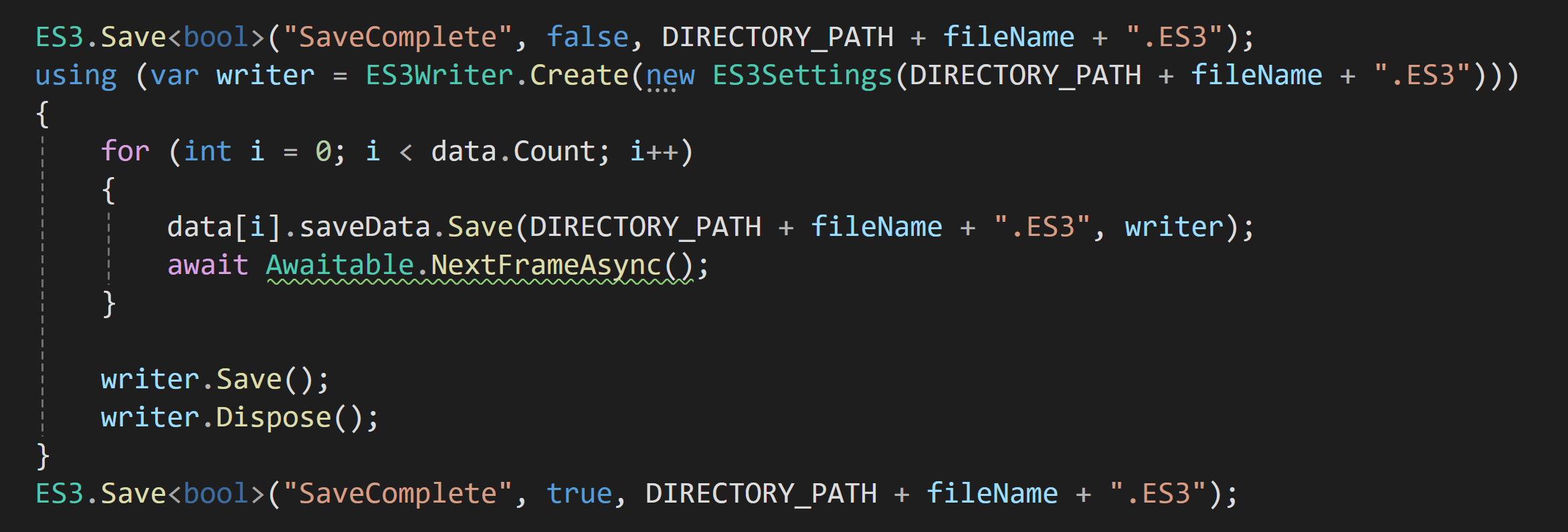
I went through several iterations trying to solve this problem. But the final one is the simplest and has seemly been robust enough. Before saving any game data, I set a boolean “SaveComplete” to false. Then after all the game data is saved I set it back to true.
This gives me an easy value to check and "validate” the file before loading or showing the file in a loading dialog.
Save Performance
Saving can be a slow process, it certainly was in my game, and it can interrupt the players experience. Saving over multiple frames can be an okay solution, but could also potentially cause some synchronization issues if data changes during those frames. Just something to keep in mind as you build your system.
In my case spreading the saving out over several frames was still too slow and I needed something more.
So I went looking for ways to optimize the saving. Using Easy Save 3, each time I called ES3.Save a writer is opened and closed. Normally this isn’t a big deal or even noticealbe. But when saving data for 10,000 tiles it gets really slow.
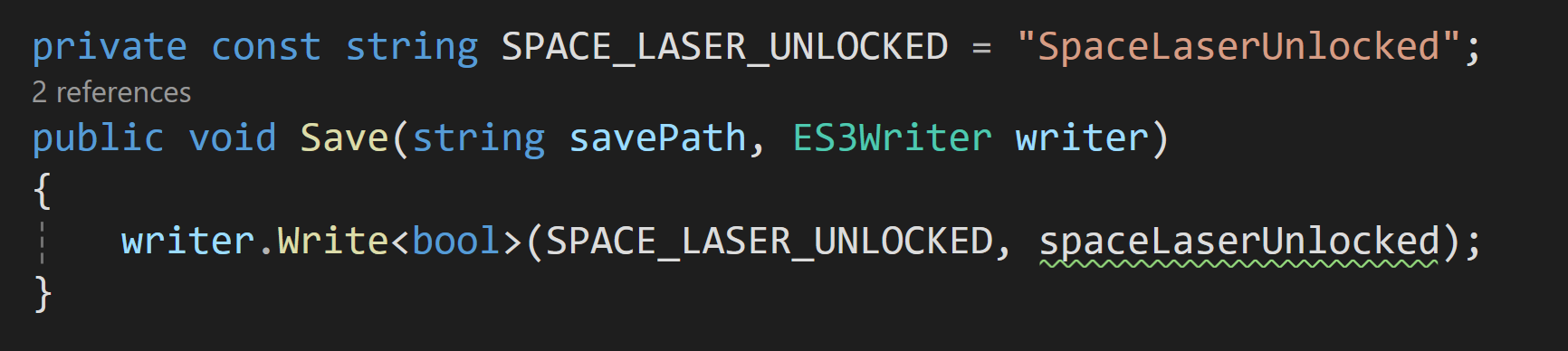
I’m sure this isn’t unique to Easy Save 3, but the work around was to pass in a reference to a writer into the Save function. This means a writer only gets created once and closed once per save. This took my save process from a very noticeable lag spike to barely noticeable. The improvement was enough that I was able to implement a proper autosave system that fires off with the start of each in game day and most players can’t tell it happened.
Who Saves Data?
In general, in my game only “manager” style classes are implementing the ISaveData interface. More important than being “managers,” these objects exist on scene load and their existance is not dependent on the state of the game or the save file.
Objects that don’t exist on scene load aren’t there and can’t load data, so if that data needs to be loaded it needs to be done through a manager style object.
My game scene is largely empty with mostly just UI and managers objects until entering play mode. If your game is built differently, with most or all objects in the scene at edit time, then the use of the interface may be spread around to a larger number of objects. Each project will have its own needs.
Final Two Cents
That’s all I’ve got. As a framework its pretty simple and easy to implement. I’ve found that the framework is easily maintainable and I’ve had no issues, as the game has grown, adding new mechanics and systems. It’s not exagerating to say that breaking the larger problem of saving the game state into a bunch of smaller problems took what felt like an insurmountable challenge and turned into many smaller fairly easy to complete tasks.