Dev Log

Game Jam... Now What?
When you finish a game jam you’re exhausted, but hopefully you’re proud of what you’ve made. Or better yet proud of what you’ve learned.
And that’s what game jams should really be about. Learning something new. Pushing yourself to create new systems or learn a new technique. And we should celebrate what we’ve learned and the new thing that we created. This is so much more important than how well you may have done compared to others.
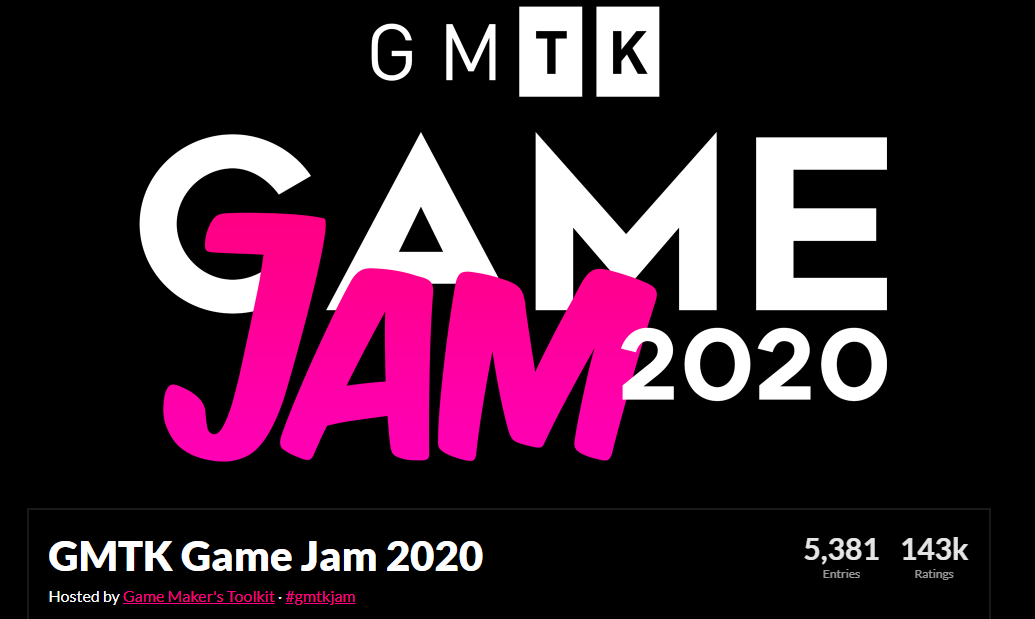
Certainly, measuring yourself against others has its place, I won’t say it doesn’t - I race bikes for fun, but that shouldn’t be your sole focus or measure of your success when taking part of a game jam.
Which is great and all, but that’s not really what this is all about. I’m not here to give a pep talk. I want to talk about what to do with your game after the jam is over. Should it just gather digital dust never to be played again? Well, maybe.
But! What if there’s more to learn? What if there’s more to do with that game?
AND THAT!
That chance - that there’s more to learn and more to do is what this series of videos and blog posts is going to be all about.
So let’s rewind a bit.
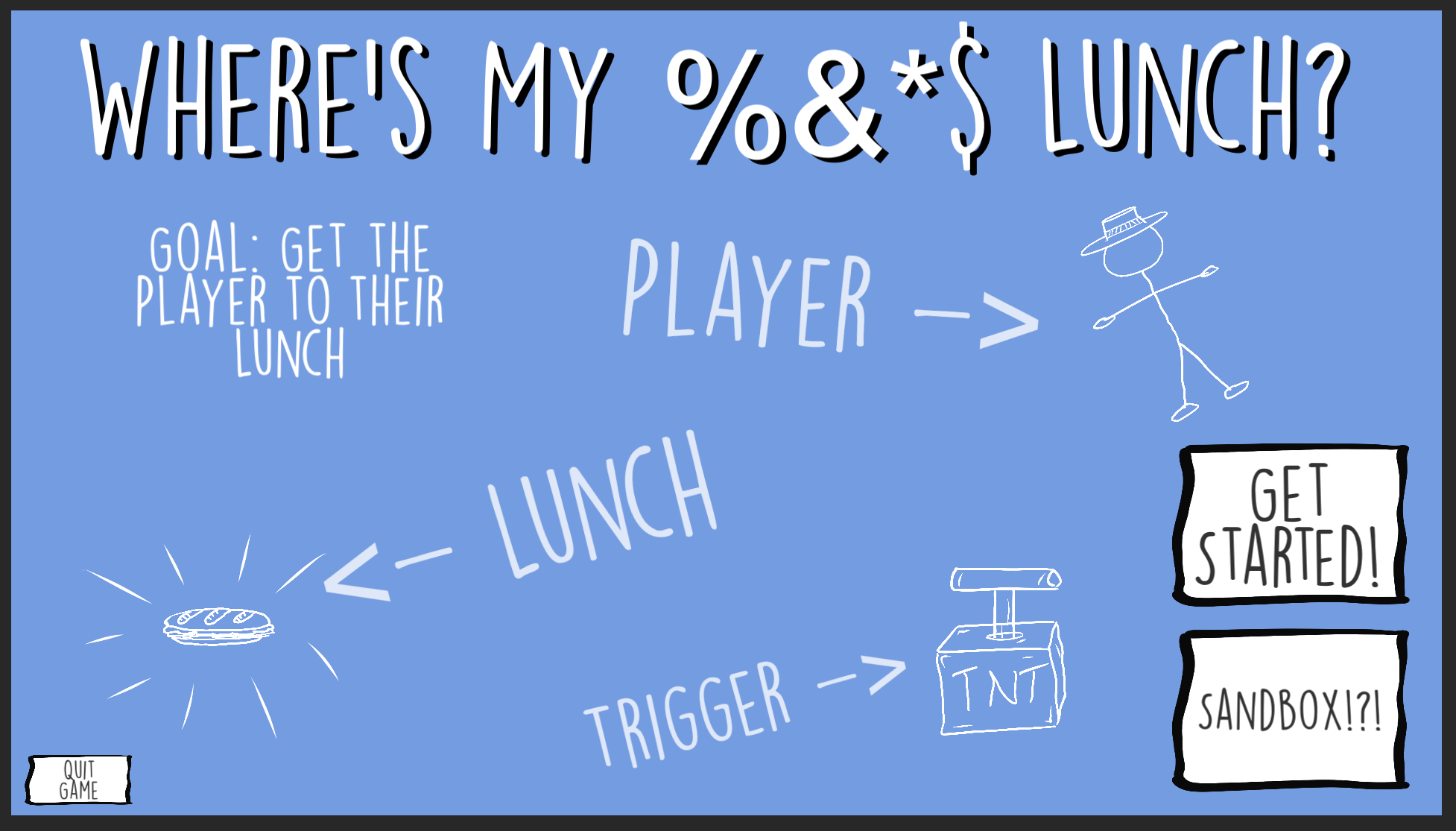
This summer, for the Game Maker’s Toolkit game jam I made the game “Where’s my lunch?” It was an okay game. Nothing profoundly creative or groundbreaking - just okay.
And I like many others I planned on leaving the game in a folder and never really looking at it again.
And then I got a suggestion from a viewer: Why not take that game and publish it? The process could make great video content and be a resource for others who might want to do more with their project.
Whoa!
I let the idea rattle around in my head for a few days - then a few weeks. The more I thought about it the more I liked it.
Over the last year or two I’ve been far more focused on making video content rather than working on my own project. Which means I often just have a few hours a month to work on the game. The progress is slow AND that progress is further slowed by needing to remember what I was doing two weeks ago or what problem I was trying to solve last month.
It’s not working great. And I suspect some of you know exactly what I’m talking about. It’s really really hard to find 10-20 hours a week to work on a project.
Now by their very nature game jam games are simple. Their scope is small - even tiny - and that makes it perfect for me, and maybe you.
Game Jam to Steam (GJTS)
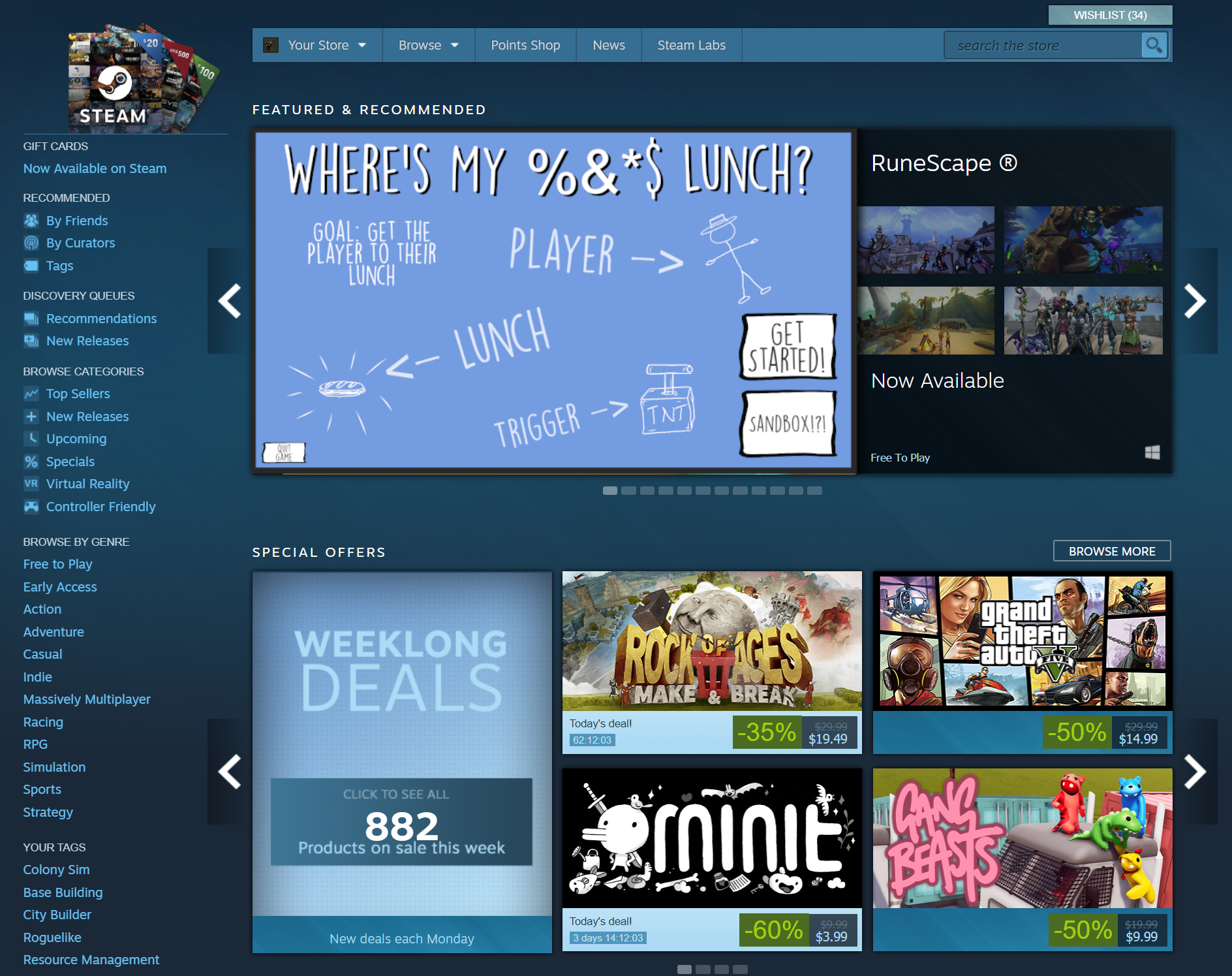
We can all dream… right? :)
So maybe, just maybe… I can work on a game AND create decent tutorial content for the channel at the same time!
Now, this project isn’t going to make me piles of money - I don’t think that’s even a distance possibility and that’s really not the goal. The goal is to make something, finish that something... AND! Document the process so that others, maybe you, might do the same thing with your game.
How many of us have dreamt about publishing a game to steam? How many of us have a game from a game jam sitting in a folder that with a few months of polish could be worth sharing with a larger audience?
Now, I’m not talking about some generic 2D platformer with floaty jump mechanics that was your first Unity project. But I’m also not saying that you need to place in the top 10 of an international game jam. I certainly didn’t!

Out of 5381 games… Not too bad. Not Amazing.
Maybe your game needs some redesign or a few tweaks to be it’s best and that’s okay. “Where’s My Lunch” certainly does. It did well on fun factor and a few other bits but clearly isn’t a particularly original game idea.
And again.
That’s okay.
So let’s do it. Let’s do it together. Let’s take a game from a game jam, polish it and publish it!
Videos Incoming!
For the videos, I’ll be trying to find the sweet spot somewhere between a traditional dev log and a tutorial. All while bringing you along for the ride, showing you my progress, and hopefully helping you make progress on your own project.
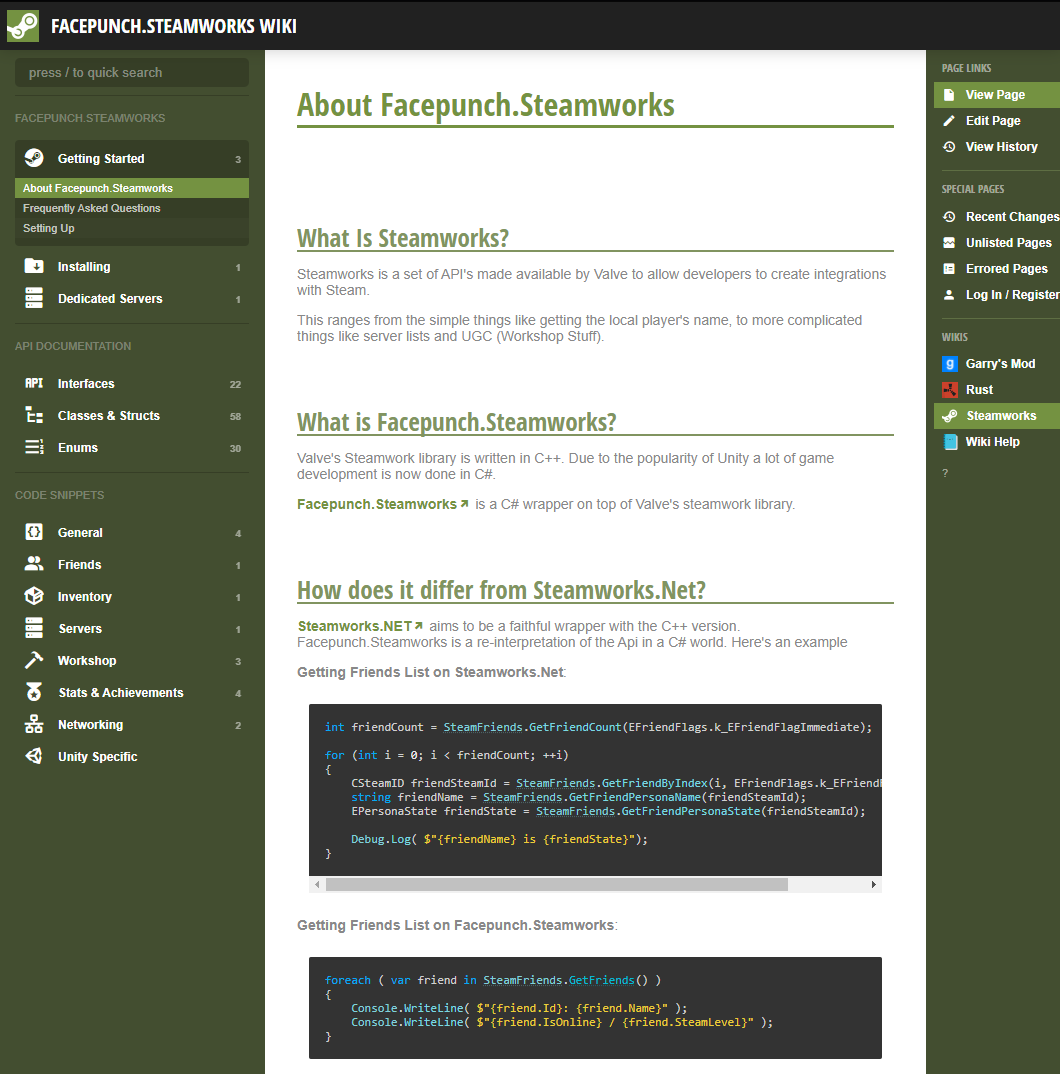
I’ll be adding the game to steam (It already is! Just not public.), making use of Facepunch Steamworks, adding Steam features such as achievements, maybe the Steam Workshop, and of course, polishing and expanding the gameplay to add dozens of levels - all hopefully without too much feature creep.
I’m also looking into several of the features offered by Unity such as analytics and cloud diagnostics...
When there’s a system or process that can be of use to the larger game development community, I’ll slow down and do more of a complete tutorial on how the system works and how I built my version of that system.
Sound interesting? Sound useful? I hope so.
So Let Me Introduce You…

Okay, doesn’t show much… This is the sandbox level
“Where’s My Lunch” is a hand drawn 2D game that presents a new puzzle to be solved by the player at each level. The goal is to steer the character towards their lunch --- but your controls aren’t very precise.
The theme for the game jam was “out of control” and that’s reflected in some of the chaos of the game play. Your only tools, in the current build, are bombs, portals, and gravity wells.
The bombs explode and exert a force.
The portals come in a linked pair and warp the player’s from one location to another.
And the gravity wells, they exert an attractive force based on distance from the player.
Now I WILL be adding to these as I work on the game, but the three mechanics were enough - or in reality it was all I could manage in a 48-hour game jam.
There are of course some bugs that need to get fixed or addressed. And mostly this has to do with placing items. At the moment it’s easy to place a portal on top of the player and then be unable to move it later. I also need to add a “clear level” functionality to let the player wipe the level and start over with a fresh attempt.
Other things like placing a gravity well near the sandwich seems to make it too easy, but more importantly, some of these flaws allow a player to “break” a level by finding a trivial solution - which is okay, but it can take some of the challenge and thus reward out of the game.
Clever level design is maybe the toughest challenge that I see in completing the game. Puzzle games, I think, are often seen as “easy” to make but the reality is they just as tough or tougher than other genres… But again I need to remind myself that the goal here isn’t to make the most awesome game just to make a decent game.
Down the Rabbit Hole!
Let’s dig in a bit into how things actually work in the game - the mechanics of the game so to speak.

Here it’s pretty simple, no surprise, and the game leans heavily on the physics engine - which does have downsides as it’s not fully deterministic - and by that, I mean that two identical starting conditions won’t have identical results - they’ll be close but not perfect.
But that’s a battle for another day, and the built-in physics engine is plenty good enough for my project.
The player object is a ragdoll with a basic bone structure built from 2D hinges. There’s not really any gameplay mechanics here, it’s just a lot more fun to watch the player fly across the screen with the arms and legs flopping all over the place.

Since the physics engine is non-deterministic, I chose to use a large circle collider on the player body as this made the motion of the object more repeatable with just a small loss in floppy ragdoll goodness.
After that, the code is mostly about triggers and a little custom code for each of the tiles or objects in the scene.
As a fun challenge during the game jam and at the suggestion of a viewer, I added a sandbox level that allows the player to create their own level from scratch. This is one of the systems that I plan on expanding so that players can not only build levels but share those levels! Hopefully using the Steam Workshop functions.
Maybe I’ll even be able to incorporate some player-made levels in the final build…?
During the game jam, I quickly realized that I needed to streamline the workflow for making and saving levels. Having each level in its own scene was going to get messy in a hurry! I needed a better way.
One of the great things about game jams is you are forced to get creative and do so efficiently and as a result, I came up with a simple but effective scene creation system.
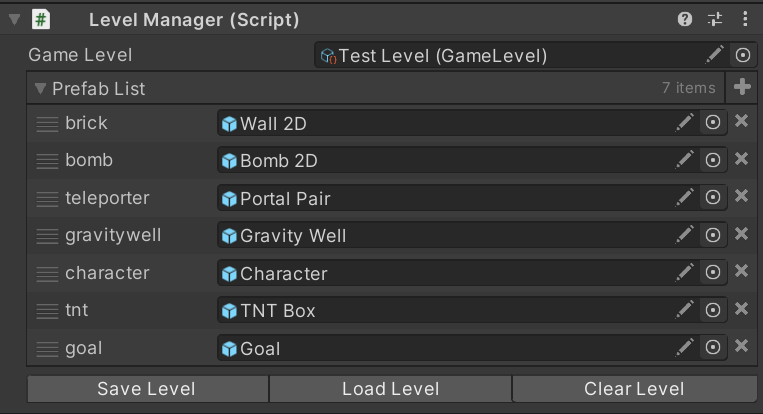
My system, which I’ll do a full tutorial on, essentially scans the scene in the editor for game tiles which all have a “save level object” component and then stores the basic transform information for each object as well as a reference to what type of object it is. The data is stored in a list on a scriptable object.
Since the data is stored in a simple list, I’m hoping this will make using 3rd party tools like Easy Save quick and hopefully relatively painless. The plan is to have each level stored in a separate save file which can, hopefully, be shared between players on the Steam Workshop. I’ve never done any work with the Steam Workshop, so I’m pretty excited about that!
And that’s pretty much it. There are certainly other chunks of code, such as the code that allows the player to wrap around the screen or to trace the path of the player, but those are small details and not core functionality. If you want to see those bits, let me know in the comments below.
What’s Next?
Where is the game going? What’s going to be added?

I’ve got a list of new mechanics that I want to add to the game. These include buttons, levers, doors, flame throwers, ice, electric fields, and whatever else may come up. These mechanics should be easy to add and shouldn’t cause significant changes in the core architecture.
There are things that WILL require significant changes such as steam integrations like achievements and the steam workshop.
I’m also exploring the idea of adding more than one goal to the game - to give a bit more depth as the levels progress. So maybe it's not just about getting your sandwich, but maybe you need to grab a drink and chips on your way to your sandwich?
I don’t know exactly, but I do know that I need to build the code for that functionality pretty early in the project as this could affect quite a few other systems.
I’d also like to explore some sort of scoring system to add some replayability to each level. This might be the classic 3-star system or something more numeric on a leaderboard? I don’t know, but again this likely needs to get built sooner rather than later.
If you want to see the full “road map” for “Where’s My Lunch?” check out the notion page. There’s a list of everything that I’ve planned out so far… in varying detail. It’s a living document and will get updated as the project moves forward.
More Thoughts
But! The real beauty of this project is not how much can be added, but how few major systems need to be created. The game is functional. It just needs to be polished and integrated with Steam.
That’s not to say this is a short or easy project. There is a TON of work to do, but it’s the amount of work and the type of work that is manageable and doable.
So what do you say? Do you have a small game gathering dust? Why not polish that game and release it? Who cares if you make money? Simply publishing a game to steam is a huge accomplishment in and of itself!!
So go blow the dust off your game AND stay tuned to the channel as this project gets started.

Strategy Pattern - Composition over Inheritance
The strategy pattern is a subtle pattern. It’s all about minimizing the duplication of code and decoupling classes. As an added bonus, the strategy pattern can also allow behaviors or algorithms to swapped at runtime without any messy switch statements or long chains of if statements. In the end it doesn’t have a super flashy or exciting outcome. It’s just good coding practice.
With some aspects of the pattern it’s easy to think, “Yeah, but this other way works…” But! The pattern is solid and avoids lots of little issues that can pop up later down the road when your project gets bigger.
Before we jump into the pattern lets first look at the problem it solves.
Inheritance Is Not Always Awesome
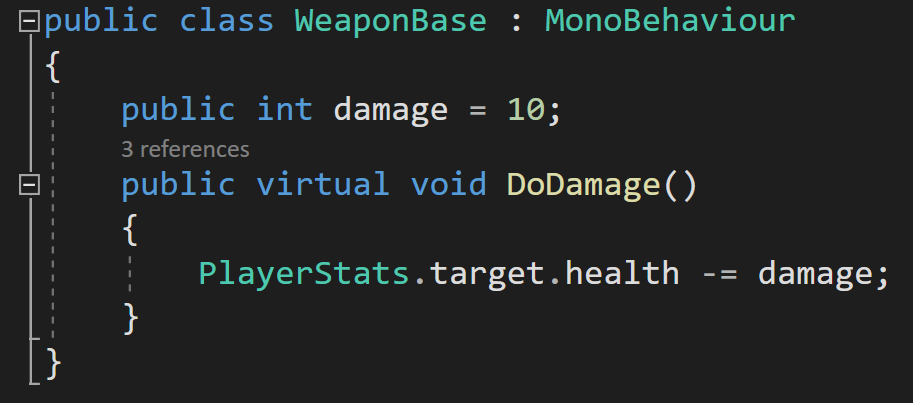
Let’s imagine you’re making a game based around weapons, or at least has a lot of them in your game. It would seem reasonable to create a “Weapon Base” class that other weapons can inherit from. This base class can contain basic stats and functions that can be used or overridden by sub-classes.
For example, we may have a DoDamage function that gets called every time a weapon is used. The function might simply reduce the health of the player’s target.
This is all reasonable.
Going a step further, let's imagine that we want to create 3 fire-based weapons that will all inherit from the WeaponBase and on top of reducing the targets health will also do some actions specifically for fire damage.
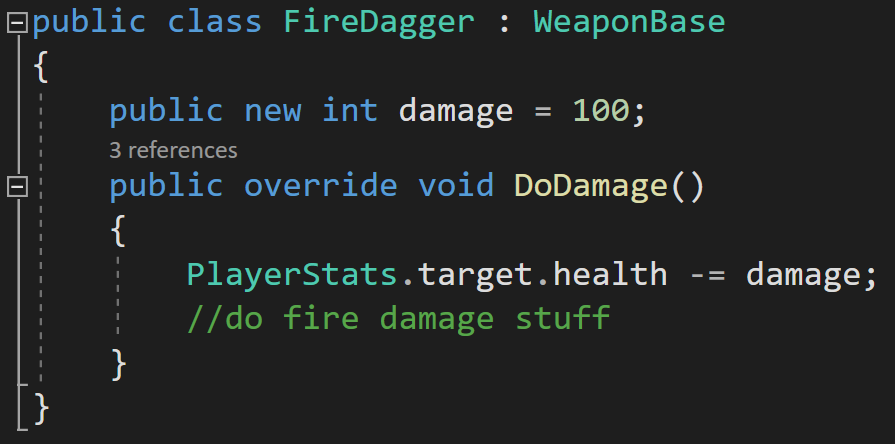
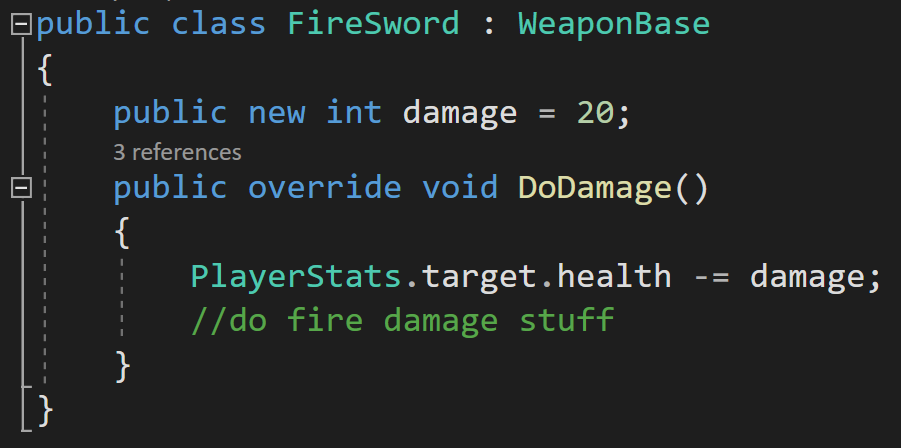
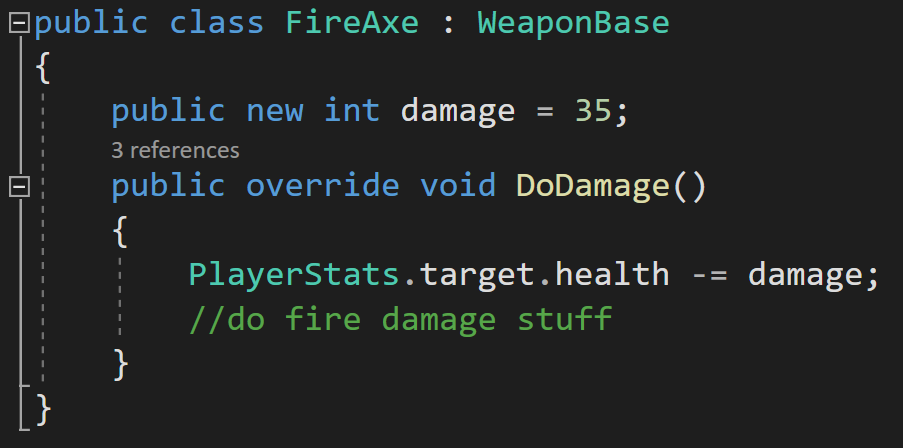
I now have 3 new classes that all have duplicated code. The DoDamage function has the same code from the base class, plus fire damage specific parts. Updating the fire behavior means opening and changing the code in all the every fire weapon class in your project. This isn’t horrible with 3 weapons, but imagine having 20 or 50 or 100 weapons. Yeah, that’s not going to work.
I could also call base.DoDamage, but then all my weapons would be dependent on the base class DoDamage function, which is definitely NOT AWESOME. If the base class function changes, all the inheriting classes change too and that’s not good. That’s not a solid foundation to build on. That’s a way to break your game in a hurry. This coupling between classes is what we want to reduce!
Now you might now argue that you could create a “Fire Weapon” class that inherits from the weapon base class and that all fire weapons inherit from… Which may work, but it is starting to get messy. Imagine now that you want to add ice or poision damage? You’d have to create Ice Weapon and Poison Weapon classes that those new weapons have to inherit from.
Okay, push comes to shove this might still be okay… Ugly, but okay, if the project stays small.
What if you now have a weapon that will do both fire and poison damage? Which class does it inherit from? Fire or Poison? Or do you make a combo class to inherit from? NO! Please don’t.
The strategy pattern can help solve these problems…
Strategy Pattern
The strategy pattern is all about encapsulating or wrapping up a behavior or algorithm in it’s own class. It’s also very closely related to the concept or belief that composition is better than inheritance! The exact details of how we do this are less important than the overall pattern so let’s start with a simple and common way to implement this pattern.

First, we create an interface called “IDoDamage” (you can argue all you want about using “I” to name an interface - I don’t care). This interface will have one function called “DoDamage.”
At this point, you might be thinking, “Okay, we’ll just implement the interface in all our weapons.” And that would be understandable, but it would be a mistake to do that as that would cause lots of duplicate code and not really buy us much in return from just good old inheritance.
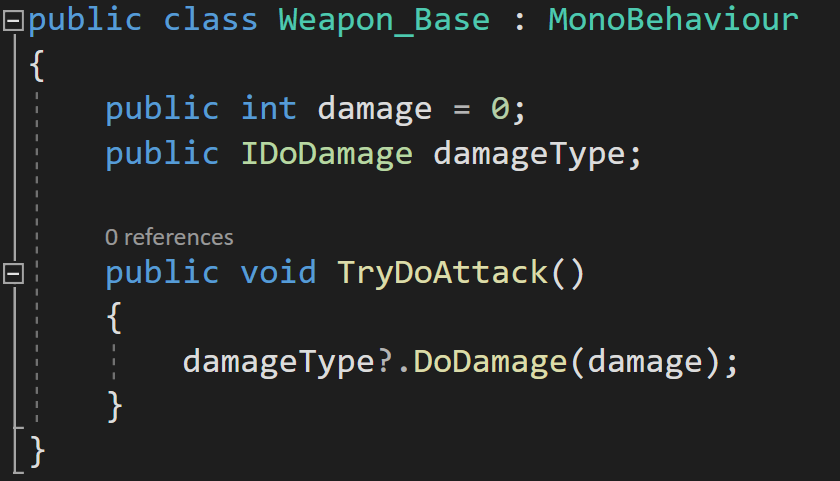
Instead, we are going to create an instance variable of this interface in the Weapon_Base class. This class will also have a function that calls the DoDamage function on the IDoDamage variable.
Why? Good question. This is the crux of the whole pattern.

We can create classes that implement the IDoDamage interface. Each of these classes will have a different damage behavior. This will encapsulate the damage behavior AND make it so that we can change behavior at runtime by a simple assignment - no ugly switch statement or crazy chain of if statements needed.
For example, we can create a “FireDamage” class. This can do all the basic damage bits and most importantly it can then do any fire specific bits - maybe there are events that play sound effects or trigger specific lighting effects.
Then!
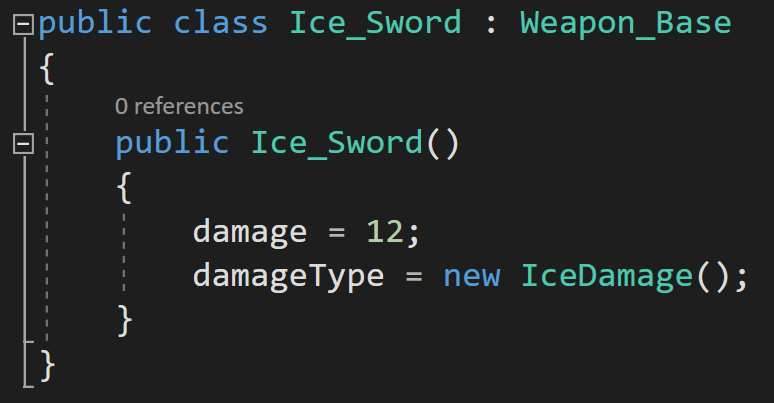
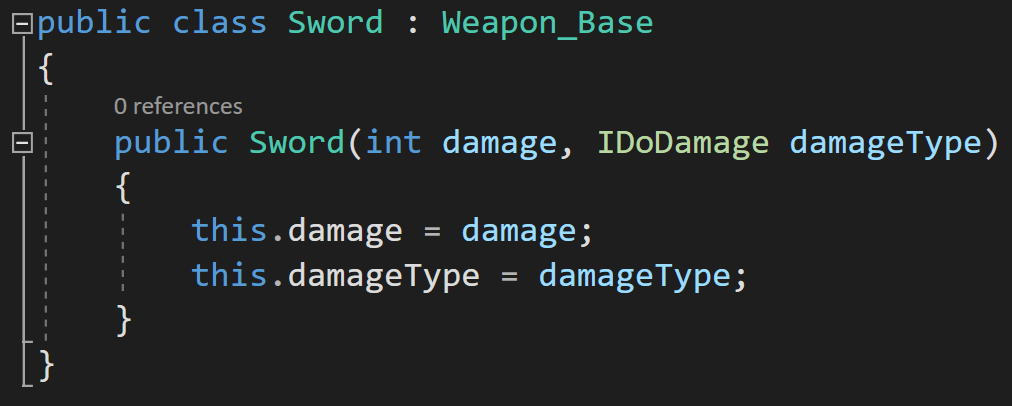
We create a new class for each weapon that inherits from Weapon_Base. Rather than hiding variables or overriding functions we use a constructor to set basic variable values AND to set the damageType variable.


While we now have a poop ton of classes, which could be a criticism of the pattern, we have very little duplicated code, and if we need to change the fire damage behavior, it only needs to be changed in one place in our project.
There is a neatness, a tidiness, a cleanliness that just feels good with this implementation. All we are doing is using a constructor to set up the weapon. The entirety of the damage algorithm or behavior is fully encapsulated in another class. While we are still using inheritance, we have decoupled much of our code, and much of the messiness of inheritance isn’t present in our solution.
Adding More Behaviors
The strategy pattern also works if you want to create other types of damage, such as IceDamage. To implement this style of attack, we need to create new IceDamage and IceSword classes.

Going Abstract
You could go either further and create generic weapons that have their damage and damage type set by a constructor. This could allow generic classes for each weapon type with all the data PLUS the behaviors injected into it.
Changing Behaviors
And I think the real cherry on top is that with the strategy pattern is that it allows easy changing of behaviors at runtime. Sure, you could do that with some if or switch statements. But those tend to be ugly. They break. They’re generally a brittle approach to programming and we can do better.
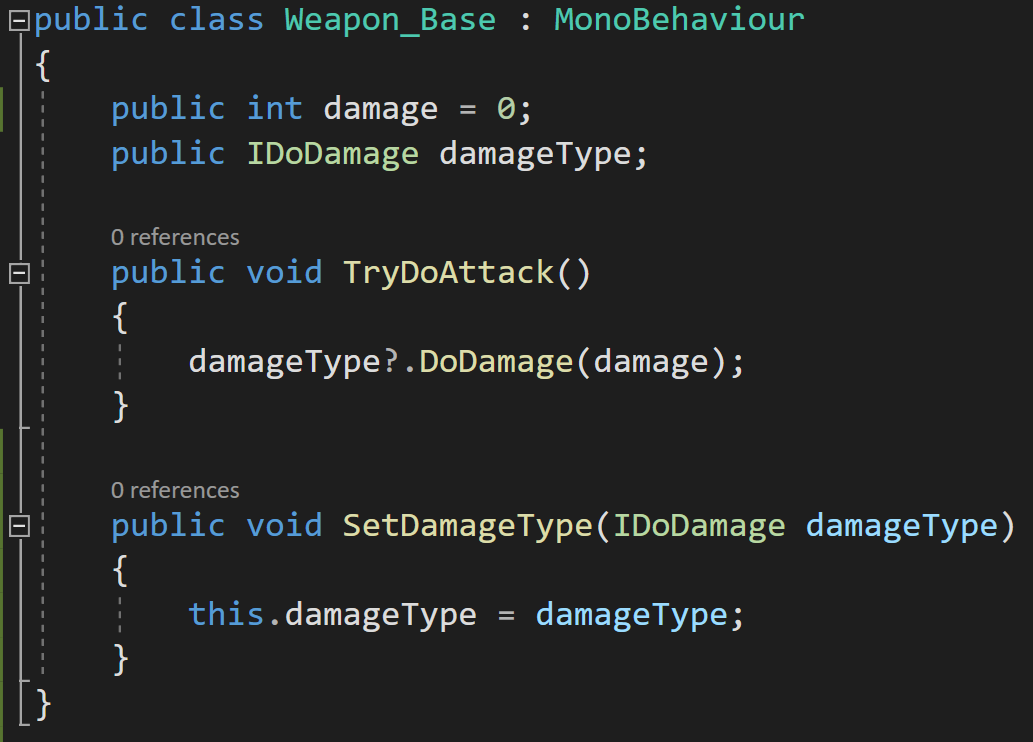
We can add a function to Weapon_Base to allow the damageType variable to be set. This would have the effect of changing behaviors. Something the code on the right.
Yes, I realize I made the variables public, but I don’t like changing values in classes from outside the class without using a function. If this was my project, I’d probably use private variables or maybe a public getter.
With this functionality, a click of a button or the invoking of an event can change the weapon's damage type and thus much of it’s behavior.
If that’s not useful. I’m not sure what is.
Combining Behaviors
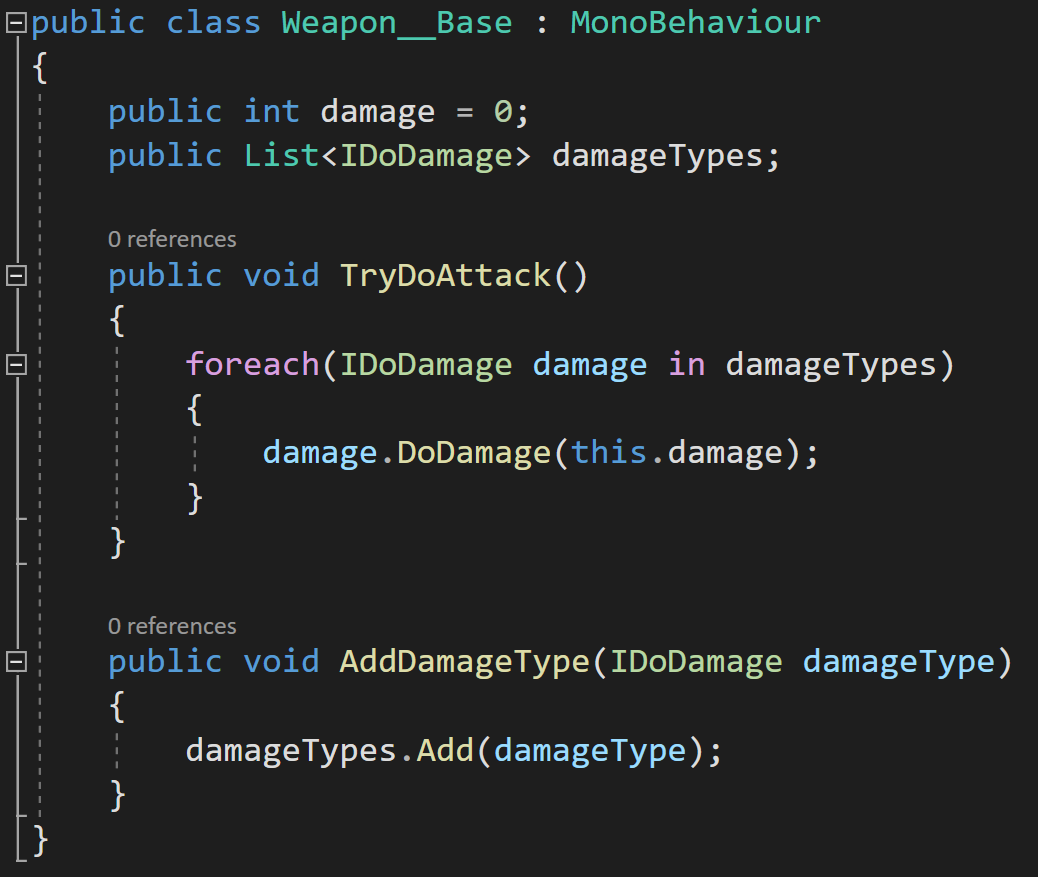
What if you really want that fire poison sword? Maybe your game is based around combining behaviors or abilities? Then what?
Make a list of IDoDamage values. The code can then iterate through the list and called DoDamage on each item in the list?
I’ll be honest I haven’t tried this but it seems solid and pretty useful.
Other Thoughts
The choice to use an interface in the strategy pattern is not the only choice. You may want to use an abstract class instead so that you can define variables. Personally I like the cleanliness of the interface and then simply injecting any needed data.
I also thought to use scriptable objects. And while I think that would work, I think it’s stretching SOs to a place they don’t fit particularly well. Writing the classes and then creating assets seemed like too many steps and I was struggling to find a situation where that would truly be better. But maybe I’m wrong?
I also wrestled with making the base class a MonoBehaviour or not. For simplicity I kept it as a MonoBehaviour so I could easily attach it to a button (for the video). I think that choice really depends on the use, but my gut say most the time I’d want it to NOT be a MonoBehaviour.
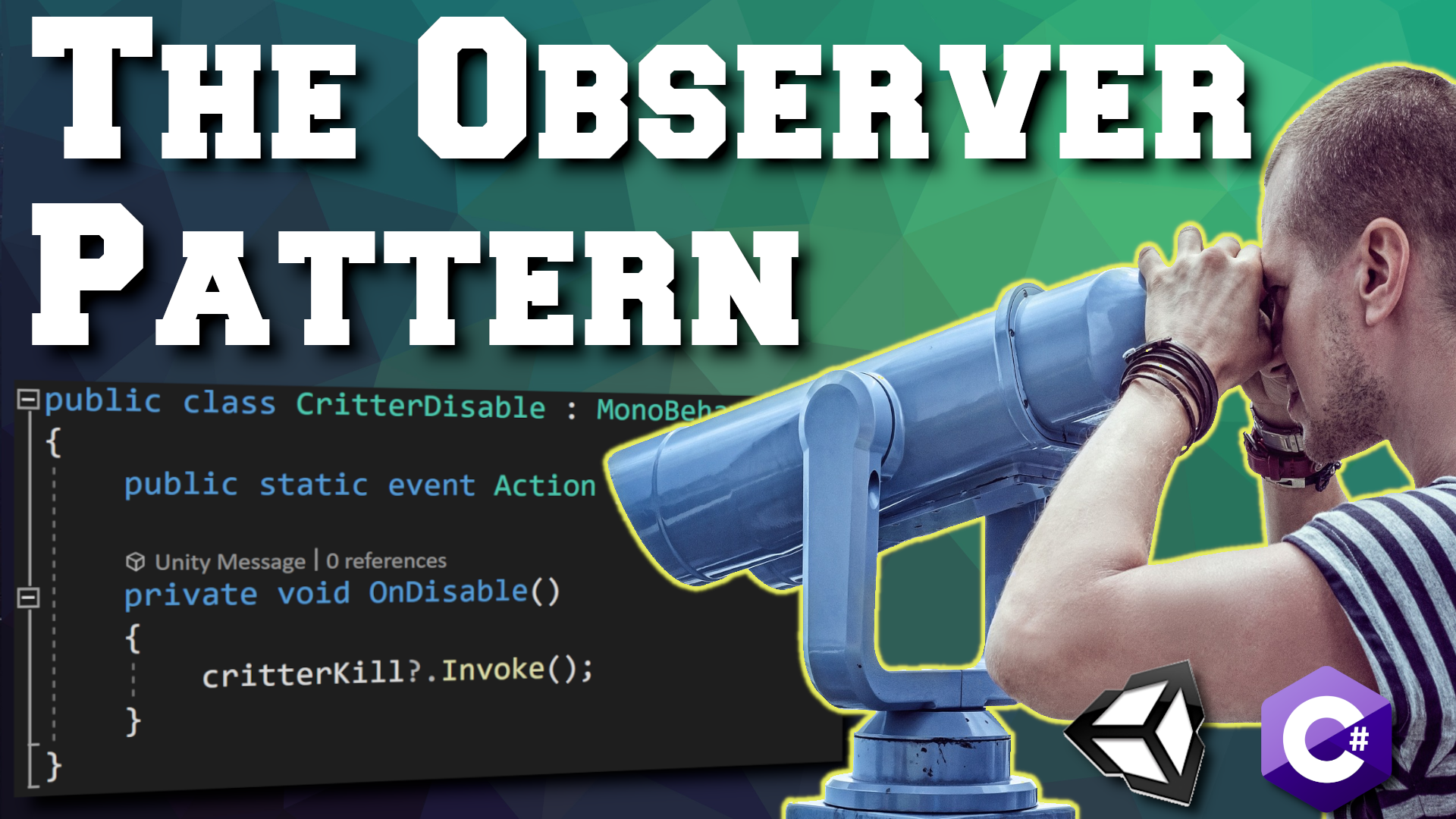
Observer Pattern - C# Events
The observer pattern is one of my all time favorites. I use it ALL the time. I’ve shared it with students and they almost immediately see the usefulness of the pattern. It’s not always the easiest to wrap your head around, but it is one of the simpler programming patterns to implement in Unity.
The Big Idea
The observer pattern is all about communication between objects, sharing information and doing so in a way that decouples the object that is sharing the information from the objects that might need or make use of that information.
Score and Achievement System
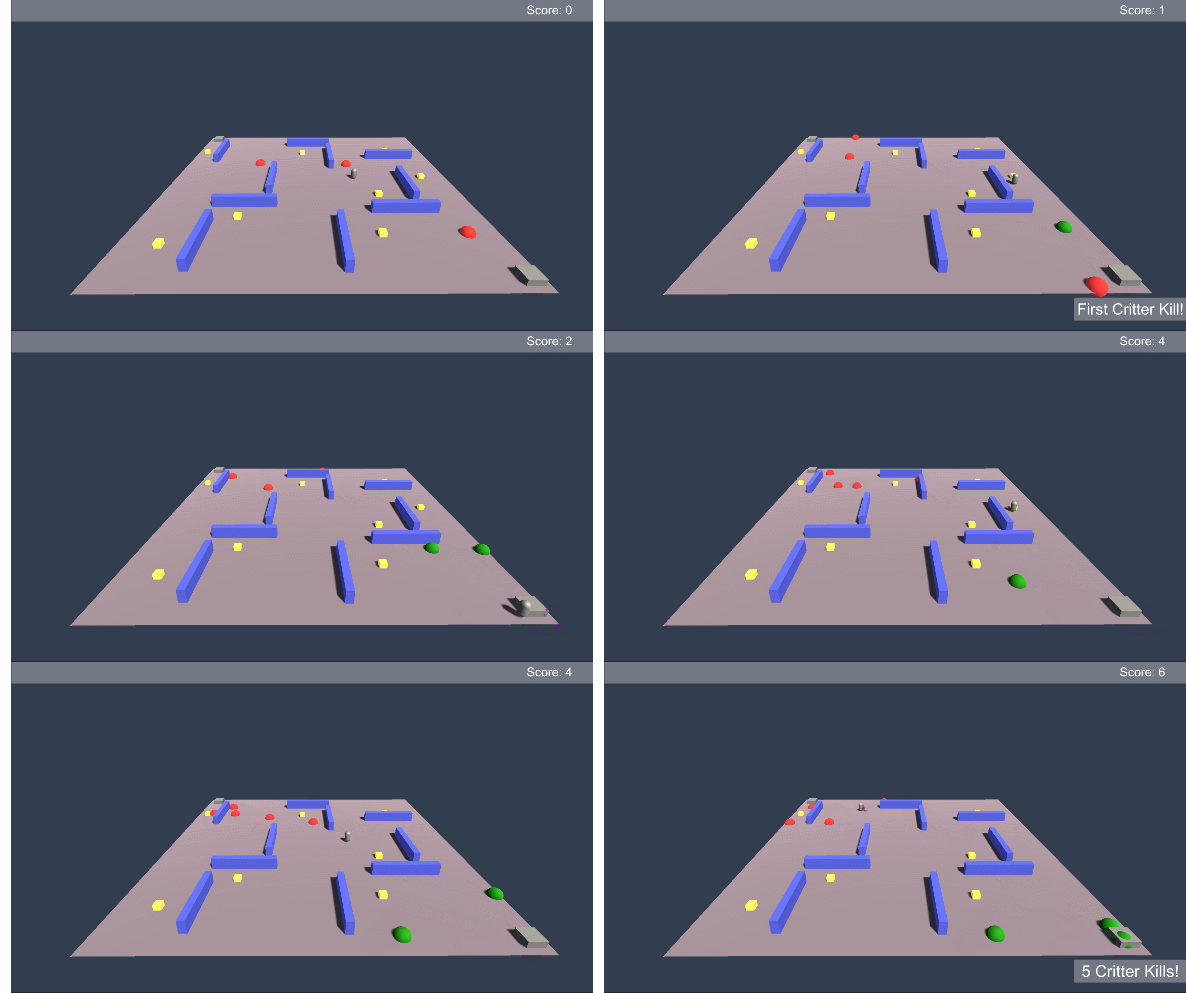
Using the same example project as for the last 2 programming patterns, let’s imagine that when the NPC kills a critter the NPC’s score goes up and gets displayed on the screen. One way to do this would be to have the critter (or the NPC) call a function or change a value on the UI element. This requires the critter to have a reference to the UI element - some form of “Find Object” or assigning it in the inspector. This works and it’s how many of us did when we first started.
But, what if there is an achievement system too. That system wants to display a message for the first kill, after 5 kills and then every 10 after that? Do you link the critter to the achievement system? Does the achievement system connect to the UI element? What if you have an audio system that plays a SFX each time the score goes up?
You can probably start to see the problem.
And it gets even worse! If the UI element changes or the designer forgets to put the achievement system in the scene then errors will get thrown and the game will start to break.
The result of all of this is a mess of spaghetti code that is highly coupled or inter-connected. If any one piece is missing from a scene the game will likely break. Plus if you change how one element works that could break all the connected pieces. This is a brittle project and will not be easy to finish. And yes, we’ve all been there.
This is where the observer pattern comes in and changes how objects communicate. Instead of all the objects being connected or having references to each other. The critter can broadcast a message that it was killed. Any objects that might be interested can choose to listen for that message (or not) and then do something based on what they’ve heard. The critter no longer cares or is aware of the UI element or the achievement system. If those systems change or aren’t in the scene - nothing breaks. If new systems want to be aware of when a critter is called all they have to do is listen for a critter to broadcast a message.
This is huge! This turns the UI and the achievement system into observers of the critters!
How Does It Work?
The observer pattern is so useful that C# has essentially baked it into the language. That makes the implementation of the pattern quick, but not always super clear or intuitive. So before we get to the implementation we’re going to talk about delegates, events, actions and a tiny bit about funcs. All of these bits are related, connected and useful. If you want to skip the explanation of these bits, you can jump down to the implementation section.
Delegates
I’ve seen few things in C# that seem to confuse folks more than delegates. There’s just something odd or mysterious about them. And admittedly there is a lot going on in the syntax of a delegate. So let’s try to clear some of that up,
And to give credit where it’s due - check out the two part video series by Sebastian Lague on delegates and events. When doing my research, I couldn’t find a better explanation than these two videos. He also goes over a few more or at least different examples that I will.
Delegates can be thought of as a variable that can be assigned a function as a value. A delegate can hold a reference to a function and then the delegate can be “invoked” and the function will be called.
Now that may seem strange. Why not just call the function itself. But you can imagine a scenario where you may want to change what a particular key does when it’s pressed. One way to do that would be to invoke a delegate each time that key is pressed. Then to reassign what the key does you simply have to change the function that is subscribed to the delegate. Easy. And hugely flexible!
But for me the real benefit comes from the fact that delegates in C# are “multicast” delegates - meaning that they can have multiple functions subscribed to the delegate. So invoking one delegate can call as many functions as needed. Add to this the fact that delegates can be made public and even static and that allows classes to subscribe and unsubscribe from the delegate.
And that right there is the basis for the observer pattern!
To keep things grounded, let’s think about what this means for our example project. If our critter has a “CritterKilled” delegate that gets invoked when the critter dies, then our scorekeeping UI element and our achievement system can both subscribe to that delegate. Whenever a critter dies it invokes the delegate which in turn calls a function on the UI element and a function in the achievement system! Each class is in full control of which delegates it listens to. The UI element and the achievement system have become “observers” of the critters!
Basic Implementation

A very basic even silly implementation of Delegates
To use delegates we must first define the delegate itself. You can see this in the first line of code (after the class definition) on the right. We then need an instance of the delegate - these can be defined locally inside a function or in this case they are defined with a class wide scope. It is this instance of the delegate that will be subscribed to and invoked!
We then need to subscribe a function to the delegate. This is done with an assignment statement. Notice that we have not included the parathesis after the name of the function! We are assigning the function NOT calling the function.
It’s weird. I know.
The last step is to invoke the delegate. This line also checks if there are any subscribers (actually it’s a null check) - this is done by the question mark. If a delegate is invoked and there are no subscribers an error will get thrown - which is why we need to check before invoking.
Now to be clear. This is a simple implementation. Not necessarily how it should be done, but I want to walk through delegates step by step and not jump straight into the shortest but most abstract syntax.
More On Delegates

Examples of return values and input parameters
Delegates can have multiple input parameters and can even have a return value - or both. It’s important to note that any function that is subscribed to a delegate must have the same input parameters and return value in order to not throw an error.
The input parameters are a great way to send information to other objects. For example when a critter dies it might want to send a reference to itself so that systems know which critter died. That’s not needed in this example, but can be useful in plenty of other cases.

Subscribing and Unsusbscribing of two funtions
In general return values are not used. This comes from the fact that delegates are multicast and can call multiple functions which could mean multiple return values. However, only the return value of the last called function will be returned, which can cause all kinds of confusion as it’s not easy or even always possible to control the order that functions are subscribed.
One than one function can be added to a delegate by using the += operator with each function. This operator adds a particular function to the delegate and likewise the -= operator will remove a particular function from the delegate. In general, it’s a good practice to do this in the OnEnable and the OnDisable functions. This is particularly important when a delegate is public and functions from other class are subscribing. If a function from a class instance doesn’t unsubscribe and the class instance is destroyed an error will be thrown when the delegate is invoked.

Example of a static instance of a Delegate
Also if the assignment operator = is used all other functions will be removed from the delegate, so in general += and -= are the best practice for subscribing and unsubscribing.
As mentioned above delegates can be made public and even static. In general, I have found that public static delegates are the most useful for the observer pattern. If delegates are made public and static they are accessed (and thus subscribed) to just like any other public static property or field.
Events
Great… So what about events?

Example of a Public Static Event - with an error!
Glad you asked. Events are just delegates. The difference is that when we are creating an “event” we are actually going to create a delegate but with the keyword “event” in front of the delegate. This does is a few very important things.
With a generic public delegate the list of subscribed functions could be overwritten by any class OR that delegate could be invoked by any class. Neither of these are good things - at least in general. Using the “event” keyword prevents these two actions from happening. All that can be done publicly to an event is to add or remove a subscriber - which is much safer!
Beyond that the implementation of an event is identical to a standard delegate! Notice that when the assignment operator is used we get an error.
Actions and Funcs

Okay, so delegates are awesome. What’s the deal with actions and funcs?
Both of these are objects inherit from delegates. And in reality they are just shortcuts to create a delegate. Actions are delegates that can have input parameters, but do not have a return value. Whereas funcs are delegates that can have input parameters and have a return value - funcs handle “return values” as an out value that is always the last parameter.
So what does this do for us with the observer pattern? Not a ton, but what it does do is reduce the number of lines needed to create an event.
Notice that each event is now defined on a single line. The use of the action has already defined the delegate for us. Notice too that the second event will handle an integer input parameter. This is put in as a generic argument to the action. This input parameter is assigned or determined when the event is invoked. Using actions this way is just a short hand for what we’ve already done above.
Back to the Project

Define and Invoke the event
If you’re still with me and your brain hasn’t melted let’s apply the Observer pattern to the example project.
For our example all the action happens when the critters die and this of course could and should be expanded to other game mechanics as well. So to keep things simple and keep going with the theme of “de-coulping our code” I’ve created a new script that will invoke an event when the object it’s attached to (a critter) is disabled.
Nothing too fancy. This lack of “fanciness” is no small part of the appeal of the observer pattern.

Then we have code on the UI element that is displaying the score. Here, the code subscribes in the OnEnable function and unsubscribes in the OnDisable function. When the event is invoked the “Update Score” method is called.
Then finally we have the code that displays the achievement message. This is very similar in that we subscribe and unsubscribe to the event and call a function when the event is invoked.

The observer pattern in C# is basically built-in, but it is super useful all the same. This is one of those patterns that if you aren’t using it you really should be. If it doesn’t make sense, then keep working until it does, because it will make your projects so much easier to maintain, easier to add new features and best of all far less error prone.
And that’s really it.
Older Posts
-
January 2026
- Jan 27, 2026 Save and Load Framework Jan 27, 2026
-
April 2024
- Apr 10, 2024 Ready for Steam Next Fest? - Polishing a Steam Page Apr 10, 2024
- Apr 1, 2024 Splitting Vertices - Hard Edges for Low Poly Procedural Generation Apr 1, 2024
-
November 2023
- Nov 18, 2023 Minute 5 to Minute 10 - Completing the Game Loop Nov 18, 2023
-
September 2023
- Sep 13, 2023 Visual Debugging with Gizmos Sep 13, 2023
-
July 2023
- Jul 4, 2023 Easy Mode - Unity's New Input System Jul 4, 2023
-
May 2023
- May 19, 2023 Level Builder - From Pixels to Playable Level May 19, 2023
-
April 2023
- Apr 11, 2023 Input Action in the Inspector - New Input System Apr 11, 2023
-
February 2023
- Feb 26, 2023 Tutorial Hell - Why You're There. How to Get Out. Feb 26, 2023
-
December 2022
- Dec 31, 2022 Upgrade System (Stats Part 2) Dec 31, 2022
-
November 2022
- Nov 10, 2022 Stats in Unity - The Way I Do it Nov 10, 2022
- Nov 5, 2022 State of UI in Unity - UI Toolkit Nov 5, 2022
-
August 2022
- Aug 17, 2022 Knowing When A Coroutine Finishes Aug 17, 2022
-
April 2022
- Apr 23, 2022 Unity Input Event Handlers - Or Adding Juice the Easy Way Apr 23, 2022
-
March 2022
- Mar 15, 2022 *Quitting a Job I Love Mar 15, 2022
-
February 2022
- Feb 8, 2022 Split Screen: New Input System & Cinemachine Feb 8, 2022
-
January 2022
- Jan 24, 2022 (Better) Object Pooling Jan 24, 2022
- Jan 19, 2022 Designing a New Game - My Process Jan 19, 2022
- Jan 16, 2022 Strategy Game Camera: Unity's New Input System Jan 16, 2022
-
December 2021
- Dec 16, 2021 Raycasting - It's mighty useful Dec 16, 2021
-
November 2021
- Nov 22, 2021 Cinemachine. If you’re not. You should. Nov 22, 2021
-
August 2021
- Aug 3, 2021 C# Extension Methods Aug 3, 2021
-
June 2021
- Jun 27, 2021 Changing Action Maps with Unity's "New" Input System Jun 27, 2021
-
May 2021
- May 28, 2021 Unity's New Input System May 28, 2021
- May 8, 2021 Bolt vs. C# - Thoughts with a dash of rant May 8, 2021
-
March 2021
- Mar 10, 2021 Coroutines - Unity & C# Mar 10, 2021
-
January 2021
- Jan 14, 2021 Where's My Lunch? - January Devlog Update Jan 14, 2021
-
December 2020
- Dec 27, 2020 C# Generics and Unity Dec 27, 2020
- Dec 7, 2020 Steam Workshop with Unity and Facepunch Steamworks Dec 7, 2020
-
November 2020
- Nov 27, 2020 Simple Level Save and Load System (Unity Editor) Nov 27, 2020
- Nov 9, 2020 Command Pattern - Encapsulation, Undo and Redo Nov 9, 2020
-
October 2020
- Oct 28, 2020 GJTS - Adding Steamworks API and Uploading Oct 28, 2020
- Oct 9, 2020 Game Jam... Now What? Oct 9, 2020
-
August 2020
- Aug 16, 2020 Strategy Pattern - Composition over Inheritance Aug 16, 2020
-
July 2020
- Jul 24, 2020 Observer Pattern - C# Events Jul 24, 2020
- Jul 15, 2020 Object Pooling Jul 15, 2020
- Jul 3, 2020 Cheat Codes with Unity and C# Jul 3, 2020
-
June 2020
- Jun 16, 2020 The State Pattern Jun 16, 2020
-
August 2019
- Aug 12, 2019 Easy UI Styles for Unity Aug 12, 2019
-
July 2019
- Jul 3, 2019 9th Grade Math to the Rescue Jul 3, 2019
-
June 2019
- Jun 12, 2019 Introducing My Next Game (Video DevLog) Jun 12, 2019
-
May 2019
- May 29, 2019 Programming Challenges May 29, 2019
-
March 2019
- Mar 2, 2019 Something New - Asking "What Can I Learn?" Mar 2, 2019
-
November 2018
- Nov 30, 2018 A Growing Channel and a New Tutorial Series Nov 30, 2018
-
October 2018
- Oct 11, 2018 Procedural Spaceship Generator Oct 11, 2018
-
July 2018
- Jul 11, 2018 Implementing SFX in Unity Jul 11, 2018
-
May 2018
- May 31, 2018 Prototyping Something New May 31, 2018
-
April 2018
- Apr 17, 2018 When to Shelve a Game Project? Apr 17, 2018
-
February 2018
- Feb 9, 2018 State of the Game - Episode 3 Feb 9, 2018
-
December 2017
- Dec 16, 2017 State of the Game - Episode 2 Dec 16, 2017
-
November 2017
- Nov 7, 2017 The Bump From A "Viral" Post Nov 7, 2017
-
October 2017
- Oct 30, 2017 NPC Job System Oct 30, 2017
-
September 2017
- Sep 1, 2017 Resources and Resource Systems Sep 1, 2017
-
August 2017
- Aug 3, 2017 State of the Game - Episode 1 Aug 3, 2017
-
June 2017
- Jun 20, 2017 Resources: Processing, Consumption and Inventory Jun 20, 2017
- Jun 15, 2017 Energy is Everything Jun 15, 2017
-
May 2017
- May 16, 2017 Graphing Script - It's not exciting, but it needed to be made May 16, 2017
- May 2, 2017 Tutorials: Low Poly Snow Shader May 2, 2017
-
April 2017
- Apr 28, 2017 Low Poly Snow Shader Apr 28, 2017
- Apr 21, 2017 Environmental Simulation Part 2 Apr 21, 2017
- Apr 11, 2017 Environmental Simulation Part 1 Apr 11, 2017
-
March 2017
- Mar 24, 2017 Building a Farming Game Loop and Troubles with Ground Water Mar 24, 2017
-
February 2017
- Feb 25, 2017 The Inevitable : FTF PostMortem Feb 25, 2017
-
December 2016
- Dec 7, 2016 Leaving Early Access Dec 7, 2016
-
November 2016
- Nov 28, 2016 Low Poly Renders Nov 28, 2016
- Nov 1, 2016 FTF: Testing New Features Nov 1, 2016
-
October 2016
- Oct 27, 2016 Watchtowers - Predictive Targeting Oct 27, 2016
- Oct 21, 2016 Click to Color Oct 21, 2016
- Oct 19, 2016 Unity Object Swapper Oct 19, 2016
-
September 2016
- Sep 18, 2016 Testing Single Player Combat Sep 18, 2016
-
May 2016
- May 25, 2016 Release Date and First Video Review May 25, 2016
-
March 2016
- Mar 26, 2016 Getting Greenlit on Steam Mar 26, 2016